
You know the feeling. You watch a 40-minute lecture or podcast, you know the good bit was somewhere around the middle, and now you are dragging the playback bar back and forth like a detective reviewing CCTV footage.
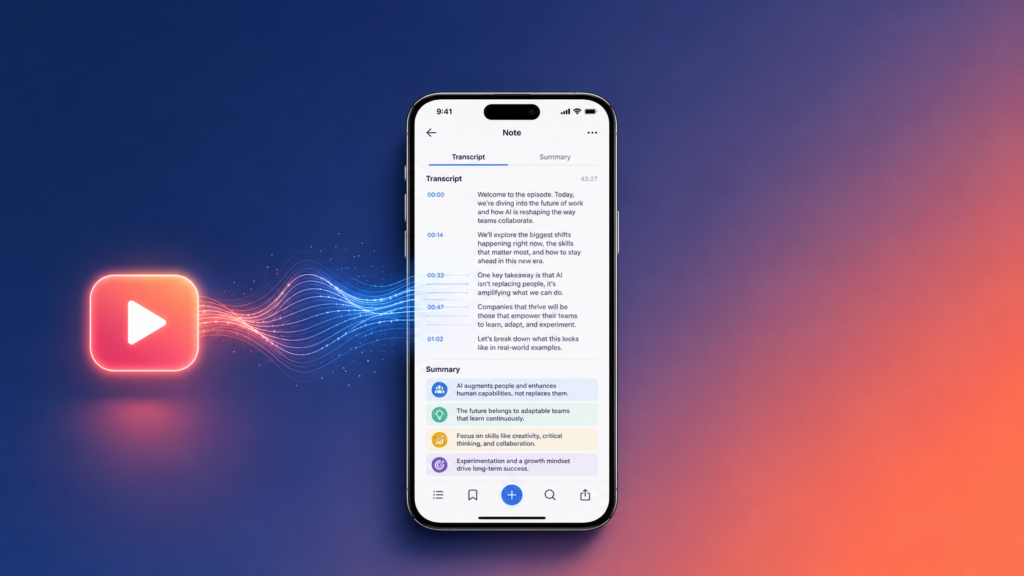
There is a faster way. Modern AI can turn any YouTube video into a full, readable transcript in seconds, then hand you a summary and the key takeaways on top. This guide shows you exactly how to do it on your iPhone or iPad, and how the same trick works for voice recordings and PDFs too.
The problem with taking notes from video
Video is brilliant for learning and terrible for reference. Studies, lectures, tutorials and podcasts lock their best ideas inside a timeline you cannot skim. If you want to quote something, check a detail or revise for an exam, your options have traditionally been:
- Watch the whole thing again at 2x speed and hope you catch it
- Pause every 30 seconds and type notes by hand
- Copy YouTube’s auto-captions, which arrive as a wall of unpunctuated text with no structure
None of these respects your time. Option three is especially painful because raw captions have no paragraphs, no speaker breaks and no summary. You still have to do all the thinking yourself.
How to transcribe a YouTube video to text in three steps
Here is the whole process using Converge Note AI, a free AI note-taking app for iPhone and iPad:
Step 1: Copy the YouTube link. Any public video works. Lectures, interviews, tutorials, podcasts, conference talks.
Step 2: Paste it into Converge Note AI. The app pulls the audio and runs it through OpenAI’s Whisper, which is currently the most accurate speech recognition model available to consumers. It handles accents, background music and fast talkers far better than auto-captions do.
Step 3: Get your transcript, summary and highlights. Within seconds, you have a clean, punctuated transcript, a summary of what the video actually says, and the most important points pulled out for you. Save it to your library or share it straight from the app.
That is it. No browser extensions, no copy-pasting captions into a separate tool, no watching anything twice.
What makes this different from YouTube’s built-in captions?
Fair question. YouTube does generate captions automatically, and you can technically open the transcript panel on desktop. Three things make a dedicated AI transcription app worth having:
Accuracy. Whisper consistently outperforms YouTube’s caption engine, especially on technical vocabulary, non-American accents and noisy audio. If you have ever seen auto-captions mangle a speaker’s name or a scientific term, you know why this matters.
Structure. Auto-captions give you fragments. An AI note-taking app gives you readable paragraphs, a summary and highlights. The difference between raw material and finished notes.
Chat with the content. This is the part that changes how you work. Once a video is transcribed, you can ask questions about it directly. “What did she say about pricing?” “List the three frameworks he mentioned.” The AI answers from the transcript, so you never scroll through pages of text hunting for one line.
It works on voice recordings and PDFs too
Transcription is only a third of the story. Converge Note AI handles the other two places your notes pile up:
Voice recordings. Tap record and talk. The app transcribes in real time and generates a summary the moment you stop. This turns your commute, your walk or the five minutes after a meeting into usable notes. Students record lectures. Founders record ideas before they evaporate. Nobody types anything.
PDFs. Upload any PDF and the AI reads it for you, then returns a summary, key highlights and practical takeaways. Research papers, reports, contracts, 60-page documents you were never going to read properly anyway. You still can read the full thing when a section matters, but now you know which section that is.
Everything you transcribe, record or upload lands in one searchable library. Six months from now, when you half-remember a point from some podcast, you search for it instead of trying to find the episode.
Who actually uses this?
Students. Record lectures, transcribe revision videos, summarise reading lists. Exam season stops being an archaeology project through three notebooks and a camera roll full of whiteboard photos.
Professionals. Meetings, training videos, industry podcasts. The people who seem to remember everything from that webinar three weeks ago are usually the people with a transcript.
Researchers and writers. Interviews, source videos, papers. Pull quotes accurately, check claims against the transcript, and ask the AI to find every mention of a topic across a document.
How much does it cost?
Converge Note AI is free to download on the App Store with in-app purchases for heavier use. Plans range from a £2.99 Starter Pack for occasional transcription up to Pro Monthly at £9.99 or Pro Annual at £59.99 for people who run their whole note system through it. You can test the core experience before paying anything.
For comparison, most standalone transcription services charge per audio minute, which adds up fast if you process lectures or podcasts regularly. An app-based plan is usually the cheaper route once you transcribe more than a couple of hours a month.
Frequently asked questions
Can I transcribe any YouTube video to text?
Any public YouTube video works. Paste the link and the app pulls the audio, transcribes it and returns a summary with highlights.
Is AI transcription accurate?
Whisper, the model Converge Note AI uses, is widely regarded as the most accurate consumer speech recognition available. It performs well on accents, technical terms and imperfect audio, though very poor recordings will still produce occasional errors. Always check quotes against the source before publishing them.
Can I transcribe voice memos to text on iPhone?
Yes. Record directly inside the app, and it transcribes as you speak, then summarises the recording automatically. You can also chat with the transcript afterwards to pull out specific points.
Does it work offline?
Transcription and AI features need an internet connection because the heavy lifting happens on secure servers rather than draining your phone’s battery. Your saved notes remain in your library.
Is my data private?
Recordings and documents are processed to generate your notes and stored in your personal library. Full details are in the privacy policy.
Stop rewinding, start reading
The gap between “I watched it” and “I have notes on it” used to be an hour of manual work. Now it is the time it takes to paste a link.
If you spend any part of your week inside videos, meetings, voice memos or PDFs, download Converge Note AI free on the App Store and run your next lecture or podcast through it. The first transcript tends to be the convincing one.
Hi, this is a comment.
To get started with moderating, editing, and deleting comments, please visit the Comments screen in the dashboard.
Commenter avatars come from Gravatar.